When I’m deep in a long Claude session, I use what I call a checkpoint strategy. It’s basically a conversational anchor.
Let’s say Claude throws out a list of ideas or questions. Before diving into one of them, I’ll drop a quick line like:
Use this as Checkpoint A for our conversation — when we come back, track the decisions made.
That way, I can explore one branch in depth, make a few choices, then jump back to the checkpoint and pick a different path — without losing the thread of what’s already been decided.
It’s like branching in Git, but for chat. Each checkpoint keeps the flow organized while I experiment with different directions.
In django rest framework, a ViewSet class can have an authentication_classes with multiple authentication backend and a permission_classes with multiple permission backends.
For the authentication backends, it is a OR relation, meaning one authentication backend returns None, the framework will try next backend.
But for permission backends, it is a AND relation, meaning all permission backends must return True to indicate that the request passes the permission check. It is a common mistake to assume that permission_classes behave like authentication_classes.
I have recently transitioned a service from
Flyway
to Django-migration based database management. To ensure a smooth data migration process, I need to verify that the Django-migrations generated DDL is compatible with the existing one.
pytest-django: how to create empty database for test cases
I am using pytest with the
pytest-django
plugin to write unit tests that compare the generated raw SQLs. I have two test cases, both of them start with empty database, one test case executes the Flyway migration, the other test case applies Django migrations. If both test cases pass the same assertions of the database, for example database contains certain tables, indexes, enum type, constraints, etc.), I can be confident about the Django migration files.
The issue is that pytest-django creates a test database instance with Django migrations executed by default. The
–no-migrations
option does not create an empty database instance. Instead, it disables Django migration execution and creates tables by inspecting the Django models.
I would like pytest-django to have an option to disable Django migration execution, allowing for an empty database instance to be created. This would enable me to test the compatibility of my Django migration files more effectively.
Solution
The solution is to use a custom django_db_setup fixture for the test cases.
@pytest.fixturedefdjango_db_setup(django_db_blocker):"""Custom db setup that creates a new empty test db without any tables."""original_db=connection.settings_dict["NAME"]test_db="test_"+uuid.uuid4().hex[:8]# First, connect to default database to create test databasewithdjango_db_blocker.unblock():withconnection.cursor()ascursor:print(f"CREATE DATABASE {test_db}")cursor.execute(f"CREATE DATABASE {test_db}")# Update connection settings to use test databaseforaliasinconnections:connections[alias].settings_dict["NAME"]=test_db# Close all existing connections# force new connection to be created with updated settingsforaliasinconnections:connections[alias].close()yield# Restore the default database name# so it won't affect other testsforaliasinconnections:connections[alias].settings_dict["NAME"]=original_db# Close all existing connections# force new connection to be created with updated settingsforaliasinconnections:connections[alias].close()
Django generated foreign key with deferrable constraints
While comparing the generated DDL, i noticed that in Django-generated DDL, foreign key constraints has a DEFERRABLE INITIALLY DEFERRED. This constraint means checking is delayed until transaction end.
It allows temporary violations of the foreign key constraint within a transaction, this can be helpful for inserting related records in any order within a transaction.
Django’s ORM is designed to work with deferrable constraints:
It can help prevent issues when saving related objects, especially in complex transactions
Some Django features (like bulk_create with related objects) work better with deferrable constraints
No Downside for Most Applications:
Deferrable constraints still ensure data integrity by the end of each transaction
The performance impact is typically negligible
If a constraint must be checked immediately, it can still enforce it at the application level
So I keep the Django-generated foreign key constraints and consider following two are equivalent
To my surprise when you search for gleam read file in google, they are not much helpful information in the first page and no code example.
There are a post in Erlang Forums where the author of Gleam language pointed to a module that no longer exists in gleam_erlang pacakge, and a abandoned pacakge call gleam_file, and a couple pacakges like simplifile.
It turns out that Gleam has excellent FFI that if you are running it on BEAM (which is the default option unless you compile Gleam to javascript), for a simple case you just need to import the function from erlang, in just two lines of code.
Django-socio-grpc
(DSG) is a framework for using gRPC with Django. It builds upon django-rest-framework (DRF), making it easy for those familiar with DRF to get started with DSG.
Although I decided to go back to DRF after exploring DSG, I chose to do so because I needed to get things done quickly. Using gRPC is considered a potential way to achieve performance gains, and there are some obstacles need to be addressed before going full gRPC. I’m leaving these notes as my learning experience.
The workflow
Using django-socio-grpc (DSG) the workflow is like following:
Currently DSG (version 0.24.3) has an issue of mapping some model fields to int32 type in protobuf incorrectly due to DRF’s decision, they should be mapped to int64 type.
It’s kind of hard to implement at library level, in application level I implemented something like this, using BigIntAwareModelProtoSerializer as the parent class of the proto serializer will correctly map BigAutoFieldBigIntegerFieldPositiveBigIntegerField to int64 type in protobuf.
fromdjango.dbimportmodelsfromdjango_socio_grpcimportproto_serializersfromrest_frameworkimportserializersclassBigIntegerField(serializers.IntegerField):"""Indicate that this filed should be converted to int64 on gRPC message.
This should apply to
- models.BigAutoField.
- models.BigIntegerField
- models.PositiveBigIntegerField
rest_framework.serializers.ModelSerializer.serializer_field_mapping
maps django.models.BitIntegerField to serializer.fields.IntegerField.
Although the value bounds are set correctly, django-socio-grpc can only map it to int32,
we need to explicitly mark it for django-socio-grpc to convert it to int64.
"""proto_type="int64"classBigIntAwareModelProtoSerializer(proto_serializers.ModelProtoSerializer):@classmethoddefupdate_field_mapping(cls):# Create a new mapping dictionary inheriting from the basefield_mapping=dict(getattr(cls,"serializer_field_mapping",{}))# Update the mapping for BigInteger fieldsfield_mapping.update({models.BigIntegerField:BigIntegerField,models.BigAutoField:BigIntegerField,models.PositiveBigIntegerField:BigIntegerField,})# Set the modified mappingcls.serializer_field_mapping=field_mappingdef__init_subclass__(cls,**kwargs):super().__init_subclass__(**kwargs)cls.update_field_mapping()"""A ModelProtoSerializer that automatically converts Django BigInteger fields to gRPC int64 fields by modifying the field mapping."""
Major obstacles for using gRPC
The biggest obstacle is that browsers do not natively support gRPC, which relies on HTTP/2.0. As a result, client-side frontend calls to backend services from a browser using gRPC require a proxy, typically Envoy. This setup involves additional overhead, such as configuring a dedicated API gateway or setting up an ingress. Even with a service mesh like Istio, some extra work is still necessary.
The next challenge is how to corporate with existing RESTful services if we chose to add a gRPC service. For communications happen between RESTful service and gRPC service, a gRPC-JSON transcoder (for example
Enovy
) is need so that HTTP/JSON can be converted to gRPC. Again some extra work is needed at infrastructure level.
The last part of using gRPC is that data is transferred in binary form (which is the whole point of using gRPC for performance) makes it a little bit harder for debugging.
Conclusion
Django-socio-grpc is solid and its documentation is good. However, the major issue is the overhead work that comes with using gRPC. I will consider it again when I need extra performance and my team’s tech stack is adapted to gRPC.
Gleam language: how to find the min element in a list
Gleam language standard library has a
list.max
to find the maximum element in a list, but to my surprise it doesn’t provide a counterpart list.min function, in order to do that, you have to use compare function with order.negate
importgleam/listimportgleam/intimportgleam/orderpubfnmain(){letnumbers=[5,3,8,1,9,2]// Find the minimum value using list.max with order.negate
letminimum=list.max(numbers,with:fn(a,b){order.negate(int.compare(a,b))})// Print the result (will be Some(1))
io.debug(minimum)}
Another noteworthy aspect is that when a list contains multiple maximum values, list.max returns the last occurrence of the maximum value. This behavior contrasts significantly with Python’s list.max, which returns the first occurrence in such cases. I observed this discrepancy while comparing different implementations in both languages.
This git principle advocates for a workflow that balances a clear main branch history with efficient feature development.
1. Merge into main:
Purpose: Keeps the main branch history clean and linear in terms of releases and major integrations.
How it works: When a feature is complete and tested, it’s integrated into main using a merge commit. This explicitly marks the point in time when the feature was incorporated.
Benefit:main branch history clearly shows the progression of releases and key integrations, making it easier to track releases and understand project evolution.
2. Rebase feature branches:
Purpose: Maintains a clean and linear history within each feature branch and simplifies integration with main.
How it works: Before merging a feature branch into main, you rebase it onto the latest main. This replays your feature branch commits on top of the current main, effectively rewriting the feature branch history.
Benefit:
Linear History: Feature branch history becomes a straight line, easier to understand and review.
Clean Merges: Merging a rebased feature branch into main often results in a fast-forward merge (if main hasn’t advanced since the rebase), or a simpler merge commit, as the feature branch is already based on the latest main.
Avoids Merge Bubbles: Prevents complex merge histories on feature branches that can arise from frequently merging main into the feature branch.
In essence:
main branch: Preserve a clean, chronological, and release-oriented history using merges.
Feature branches: Keep them clean and up-to-date with main using rebase to simplify integration and maintain a linear development path within the feature.
Analogy: Imagine main as a clean timeline of major project milestones. Feature branches are like side notes. Rebase neatly integrates those side notes onto the main timeline before officially adding them to the main history via a merge.
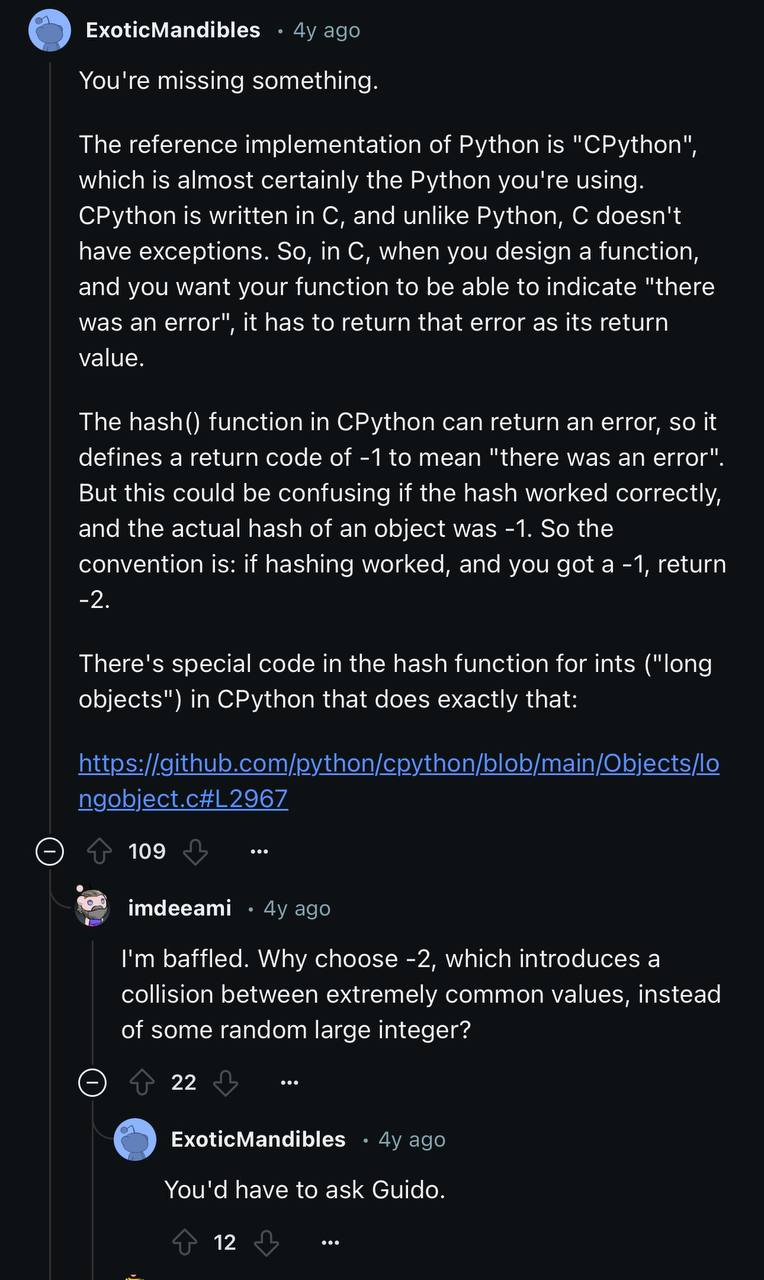
TIL Python use the integer itself as the hash value, except for -1. hash value for -1 is -2.
# For ordinary integers, the hash value is simply the integer itself (unless it's -1).classint:defhash_(self):value=selfifvalue==-1:value==-2returnvalue